How to read Meta ads reports and what to optimize every week
By The Clear Path Media House team · · 6 min read
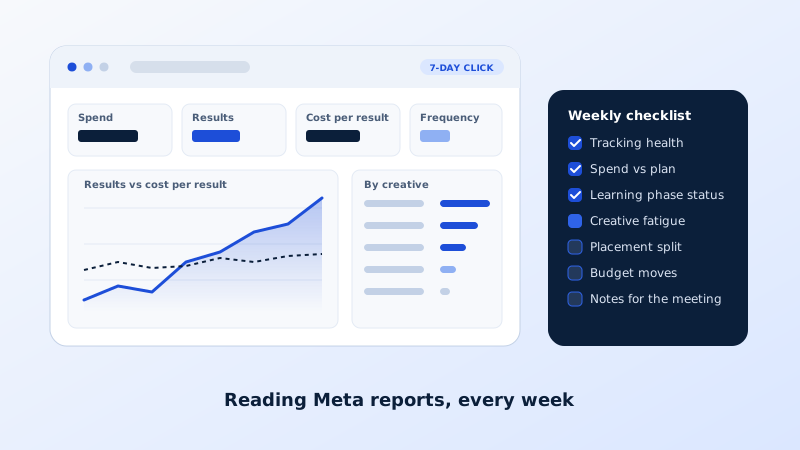
Ads Manager offers hundreds of columns, and most of them will mislead you if you read them in the wrong order. Owners who open the dashboard every morning tend to react to noise: pausing an ad because yesterday was slow, raising a budget because one day was good. This article lays out how we read Meta reports for clients, which numbers matter in which order, and a weekly checklist of what to adjust and what to leave alone.
Set up the view before you read the numbers
Start with attribution. Meta's default is 7-day click and 1-day view, meaning a conversion counts if someone clicked within seven days or saw the ad within one day. Choose a setting that matches your sales cycle and keep it constant; comparing weeks under different settings is meaningless. Use the compare attribution settings option to see how much of your result is view-through, which is softer evidence than a click.
Then build a saved column set with only what you need: amount spent, results, cost per result, conversion value, return on ad spend or cost per lead, impressions, reach, frequency, CPM, outbound click-through rate, landing page views, and the video metrics when you are reviewing creative. Save it, and resist adding columns during the review. Set the date range to the last seven full days, compare with the previous seven, and look at the campaign level first before drilling down.
The four numbers that matter, in order
First, spend against plan. Did the account spend what was intended? Under-delivery points to a learning problem, a bid cap that is too tight, a rejected ad or a payment issue, and nothing else can be judged until it is explained.
Second, cost per result or return on ad spend for the conversion you optimize for, compared with the previous period and with your break-even. This is the number the business cares about. Judge it on seven days, never on one.
Third, volume: the number of results. Efficiency on tiny volume is fragile. An ad set with four purchases this week and six last week has not become worse in any meaningful sense; it has produced too little data to say.
Fourth, the diagnostics that explain movement in the first three: CPM for auction cost, outbound click-through rate for creative appeal, landing page views against link clicks for page speed, conversion rate from landing page view for the page itself, and frequency for fatigue. Read these only to explain changes, never as goals in themselves.
The weekly checklist
Once a week, at a fixed time, work through the same list.
- Tracking health. Open Events Manager and confirm events are arriving from both browser and server, deduplication is working, and match quality has not dropped. A site update that broke the pixel is the most common cause of a sudden "performance drop".
- Spend and pacing. Compare delivered spend with the plan and check that no ad set is stuck in learning limited or capped by a bid.
- Creative fatigue. For each active ad, look at frequency, click-through rate and cost per result over the last fourteen days. Rising frequency with falling click-through rate is fatigue. Note which ads to retire and which concepts to brief for the next batch.
- Breakdowns. By placement, age and gender, device and region. Look for a segment that spends heavily with no results, but act only when the pattern has held for two weeks.
- Budget moves. Shift budget toward stable winners and away from consistent losers in steps of roughly twenty percent or less. Large jumps reset learning.
- Notes. Write down what you changed and why. The log is what makes next week's review honest.
What not to touch, and the learning phase
Every time an ad set receives a significant edit, such as a large budget change, a new audience or a new bid, Meta resets the learning phase and spends the next stretch exploring again. Ad sets in learning are more expensive and less stable. Avoid daily edits, avoid editing on a Monday based on weekend data, and avoid reacting to a single bad day.
Do not judge new ads in their first three days. Do not pause and restart ads to "refresh" them; it does nothing except reset learning. Do not compare an ad set with twenty conversions against one with three and declare a winner. Treat learning limited status as a signal to consolidate ad sets or budgets, not to add more of them.
Reconciling Ads Manager with GA4 and your sales data
Meta's numbers will not match GA4 or your order system, and the gap is normal. Meta counts conversions by ad interaction with view-through included; GA4 attributes by its own model and misses many in-app browser sessions; your store or CRM counts actual orders and booked jobs. Each is right about something different.
Once a month, put the three side by side. If Meta reports far more purchases than the store processed, check for duplicate events. If GA4 shows a strong paid social channel that Meta does not claim, the pixel or your UTM parameters are leaking. Use UTM parameters on every ad URL with a consistent naming convention, and send closed sales or qualified leads back to Meta as offline conversions where you can. Over time the relationship between Meta's reported results and real revenue becomes stable, and the weekly numbers become a trustworthy leading indicator even though they are not the final tally.
Turning the report into next week's plan
A report that does not produce decisions is a screenshot. End each weekly review with a short list: ads to retire, concepts to brief, budget changes with their size and reason, tracking issues to fix, and tests to launch. Share it with whoever needs to act, then leave the account alone until the next review unless something breaks. Weekly discipline beats daily reactivity, both because the delivery system needs stability and because trends only become visible over seven days or more.
Key takeaways
- Fix the attribution setting and a saved column set before reading anything.
- Read spend against plan, then cost per result or ROAS, then volume, then diagnostics. Judge on seven days.
- Weekly: tracking health, pacing, fatigue, breakdowns, budget moves in small steps, and notes.
- Avoid edits that reset the learning phase, and do not judge ads in their first three days.
- Reconcile Meta, GA4 and real orders monthly; expect a gap and understand it.
- Turn every review into a short action list, then stop touching the account.
This weekly review is the core of our management service, and the written notes from it are what our clients receive after every meeting. If you want the reading and the decisions handled for you, request a proposal and we will show you what the first report would look like.